How to Track Macros Without Overcomplicating Your Day
A simple macro tracking system for calories, protein, carbs, and fat that keeps the focus on repeatable meals.
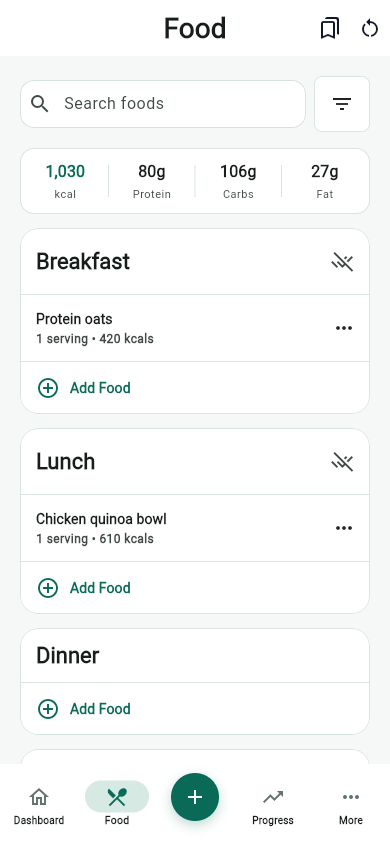
Macro tracking works best when it helps you make better food decisions, not when it turns every meal into a math problem. Start with a few useful numbers, then build repeatable meals around them.
Start with calories and protein
Calories set the broad target for the day. Protein gives your meals structure. Once those two are visible, carbs and fats can be adjusted around food preferences, training, hunger, and how your day is going.
Use meal anchors instead of perfect targets
Choose one or two reliable protein anchors for breakfast, lunch, or dinner. Then let the rest of the meal flex with fruits, vegetables, grains, dairy, beans, or healthy fats.
Save meals you repeat
The fastest macro tracking system is built from defaults. Save meals that fit your routine, then adjust portions instead of rebuilding the same entry every week.
Review the day before changing the plan
If protein is low, add a protein-forward snack or adjust dinner. If calories are tight, look for serving sizes, snacks, drinks, or restaurant meals that changed the day. Small corrections beat restarting the plan.
Keep the system small
- Track calories and protein daily.
- Review carbs and fats as context, not as a source of stress.
- Save repeat meals and recipes.
- Use weekly trends before making major changes.
Sources and further reading
- Dietary Guidelines for Americans, 2025-2030 U.S. Department of Health and Human Services and USDA
- Nutrient Recommendations and Databases NIH Office of Dietary Supplements
- Tips for Healthy Eating for a Healthy Weight Centers for Disease Control and Prevention
Related articles
- Best Food Logging App for Weight Loss: What to Look For
- High-Protein Meal Prep Ideas for Weight Loss
- Calorie Tracking vs Macro Tracking: Which Should You Use?
Take your nutrition with you.
Log food, track progress, and meet your goals anywhere.