How to Log Foods Faster With Search and Scan
Use search, barcode scanning, recent foods, and manual entry without slowing down your day.
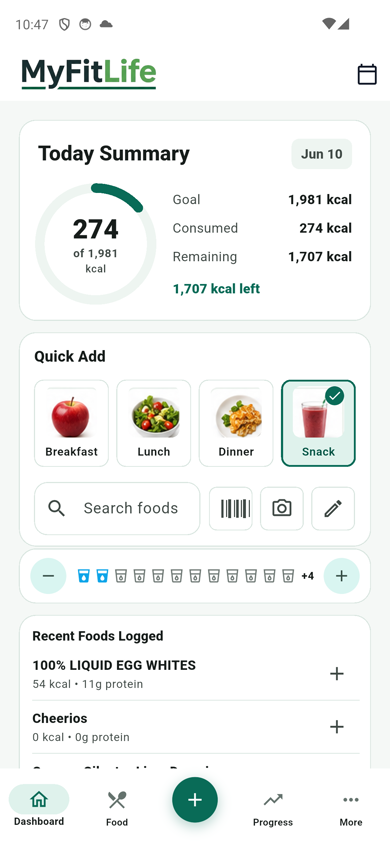
Fast logging is about choosing the right input for the moment. MyFitLife gives you search, barcode scan, photo logging, recent foods, and manual entry from the Dashboard.
The best logging method is the one you can use consistently. Some meals need accuracy. Some meals only need a fast, reasonable entry so the rest of the day stays visible.
Use recent foods first
Meals you repeat often should be logged from Recent Foods Logged. Choose the target meal, tap the plus action, and move on.
This is the fastest path for coffee, breakfast defaults, repeated lunches, snacks, and meals you already checked once. Reusing a known entry reduces search time and helps your day stay consistent.
Search when the food is common
Search works well for common foods, restaurant-style items, and simple ingredients. Type the most specific useful phrase, compare the serving size, and choose the result that best matches what you ate.
If several entries look similar, pick the one with complete calories, protein, carbs, fat, and serving details. A complete entry is usually easier to review later than a vague one.
Scan packaged foods
Barcode scanning is best for packaged items where the label data is consistent. Review serving sizes before you save the entry.
The barcode gets you close quickly, but the serving size still matters. If the label says two servings per package and you ate the full package, adjust the amount before saving.
Use photo logging for mixed meals
Photo logging is useful when a meal has several parts and search would take too long. It gives you a starting estimate that you can review, adjust, and log without rebuilding every ingredient from scratch.
Use it for bowls, plates, leftovers, and restaurant meals where exact ingredients are hard to know. For packaged foods or simple ingredients, search or barcode scan will usually be more direct.
Keep manual entry for quick corrections
Manual entry is the fallback when you already know the number you need to record or when a food does not need a database match. It is also useful for quick add calories, custom servings, or small adjustments after a meal.
A simple decision tree
- Repeated meal: use Recent Foods Logged.
- Packaged item: scan the barcode and confirm serving size.
- Common food or ingredient: search and choose a complete entry.
- Mixed plate or restaurant meal: use photo logging as a starting estimate.
- Known number or correction: use manual entry.
Fast logging is not about rushing every choice. It is about matching the tool to the meal so you keep useful nutrition feedback without turning normal eating into a long data-entry task.
Related articles
- Meal Planning With a Grocery List: A Simple Weekly System
- How to Build a Healthy Grocery List for Weight Loss
- Hydration Tracker for Weight Loss Habits: What to Track
Take your nutrition with you.
Log food, track progress, and meet your goals anywhere.