Meal Planning With a Grocery List: A Simple Weekly System
Plan meals, check your pantry, and build a grocery list that keeps weeknight eating easier.
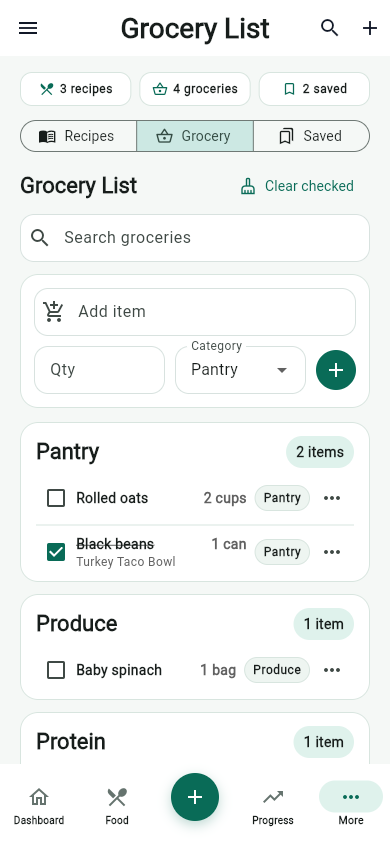
Meal planning gets easier when the grocery list is part of the same system. Instead of writing meals in one place and shopping in another, start with the meals you want to repeat and let the list follow.
Pick your anchor meals first
Choose two or three breakfasts, lunches, and dinners that fit your week. Anchor meals should match your schedule, cooking energy, and protein target.
Check pantry staples before adding more
A good grocery list starts with what you already have. Check grains, sauces, frozen proteins, canned beans, vegetables, and repeat snacks before buying duplicates.
Group groceries by how you shop
Organized lists reduce missed items. Keep produce, proteins, dairy, pantry staples, frozen foods, and household extras in separate groups so the store trip follows a predictable path.
Build in one flexible meal
Plans break when every meal is too specific. Keep one flexible recipe, bowl, wrap, or leftovers night available for schedule changes.
Weekly workflow
- Pick meals for the next three to five days.
- Review pantry and fridge staples.
- Add missing ingredients to the grocery list.
- Shop from grouped categories.
- Save the meals that worked so next week is faster.
Sources and further reading
- MyPlate U.S. Department of Agriculture
- Tips for Healthy Eating for a Healthy Weight Centers for Disease Control and Prevention
- Dietary Guidelines for Americans, 2025-2030 U.S. Department of Health and Human Services and USDA
Related articles
- How to Build a Healthy Grocery List for Weight Loss
- Hydration Tracker for Weight Loss Habits: What to Track
- AI Nutrition Coach Questions That Lead to Better Answers
Take your nutrition with you.
Log food, track progress, and meet your goals anywhere.