How to Use Recipe AI for Weeknight Dinners
Generate or import recipes that fit your targets and can move into your plan.
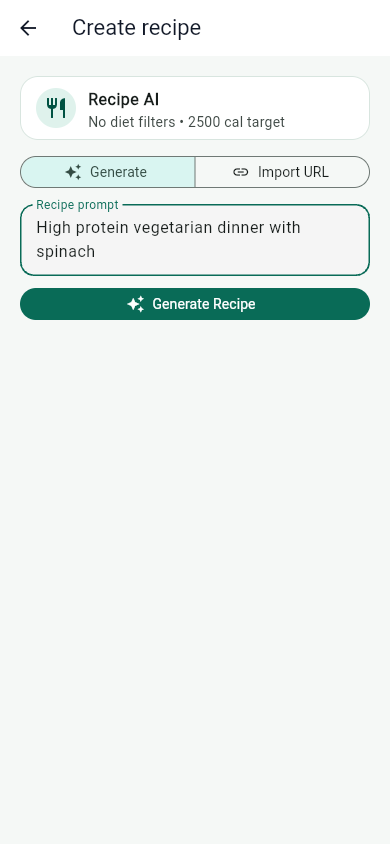
Recipe AI is most useful when your prompt is specific about the meal, protein, prep style, and constraints. A clear prompt creates a better starting point.
Weeknight dinners usually fail when the plan is too vague or too ambitious. Recipe AI works better when you give it the same guardrails you would give a person helping with dinner: what you have, what you need, and how much time you can spend.
Give Recipe AI the guardrails
Include the meal type, protein target, ingredients you want to use, and any foods you need to avoid.
A strong prompt might include the protein source, cooking method, target servings, prep time, flavor direction, and whether the meal needs leftovers. Those details help the generated recipe match real life instead of producing a generic idea.
Start with ingredients you already have
If your pantry or refrigerator already has chicken, tofu, beans, eggs, rice, frozen vegetables, or greens, mention them. Recipe AI can turn available ingredients into a plan faster than starting from a blank prompt.
This also reduces grocery friction. The best weeknight recipe is often the one that uses what is already in reach and only adds a few missing items.
Ask for nutrition-aware tradeoffs
If calories are tight, ask for a lighter version. If protein is low, ask for a protein-forward version. If sodium or fiber matters to the meal, name that too. The more specific the tradeoff, the easier it is to review the result.
- High-protein vegetarian dinner with lentils and rice, under 35 minutes.
- Chicken dinner using frozen vegetables, with leftovers for lunch.
- Lower-calorie taco bowl that still has at least one strong protein source.
- Simple salmon dinner with grocery list and two side options.
Review before saving
Generated recipes are starting points. Review ingredients, servings, preparation steps, and nutrition estimates before saving or logging the meal. Adjust portions if the recipe is larger or smaller than what you will actually eat.
When the recipe fits, save it so it can become a repeatable option. A saved recipe is more valuable than a one-time idea because it can connect to logging and grocery planning.
Save the recipes that work
When a recipe fits your targets, save it to Pantry so it can be logged again or moved into a grocery list later.
Turn one recipe into a weekly system
A useful dinner can become a template. Keep the protein and method, then swap vegetables, grains, sauces, or seasoning. This makes variety easier without creating a new cooking process every night.
- Prompt Recipe AI with meal type, ingredients, time, and target.
- Review servings, nutrition, and prep steps.
- Save the recipe if it fits the plan.
- Add missing ingredients to the grocery list.
- Log the meal when you cook it, then reuse or adjust it next week.
Recipe AI is most helpful when it shortens the path from idea to dinner. Keep prompts specific, review the result, and save the meals that are worth repeating.
Sources and further reading
- MyPlate U.S. Department of Agriculture
- Tips for Healthy Eating for a Healthy Weight Centers for Disease Control and Prevention
- Dietary Guidelines for Americans, 2025-2030 U.S. Department of Health and Human Services and USDA
Related articles
Take your nutrition with you.
Log food, track progress, and meet your goals anywhere.